Fun With Bloopers

by James Scott Bell
@jamesscottbell

We had some fun with typos recently. Fun, sure, except when they happen to you. I hate typos! They are the sand fleas of publishing. You shake off the sand from the beach, and you think you’ve got rid of them all. But sure enough, when you get in the car and start driving away, one shows up in your armpit.

So it is with typos. Even after paying a proofreader, you’re apt to get an email from an astute reader who will point out that a character should be eating out of “wooden bowl,” not a “wooden bowel” (an actual typo in a novel by a friend of mine).

Yes, typos can provide a chuckle. Even more amusing are bloopers, those verbal miscues from actors and speakers uttered over various airwaves.

The word “blooper” was popularized by a radio producer named Kermit Schaefer, who was the first to research and document these fluffs. He put out several books and a couple of LPs with them (in the latter, he sometimes reproduced the blooper with actors when he couldn’t secure a copy of the sound recording. But they were otherwise legit).

The blooper that got Schaefer started was made by radio announcer Harry von Zell in a 1931 broadcast honoring President Herbert Hoover. Von Zell told the audience they would next hear from President “Hoobert Heever.”

Oops. And on live radio there are no re-takes.

So, because I wanted to have some laughs today, here are a few of my favorite bloopers:

“And Dad will love Wonder Bread’s delicious flavor, too. So remember, get Wonder Bread for the breast in bed.”

“This is the British Broadcasting Corporation. Our next program comes to you from the bathroom at Pump…pardon me, the Pumproom at Bath.”

“And just now we’ve received a new stock of Reis Sanforized sports shirts for men with 15 or 17 necks.”

“Mrs. Manning’s are the finest pork and beans you ever ate. So when you order pork and beans, make sure Mrs. Manning is on the can.”

Laundromat commercial: “Ladies who care to drive by and drop off their clothes will receive prompt attention.”

Fight night broadcast: “It’s a hot night in the Garden, folks, and I see at ringside several ladies in gownless evening straps.”

On an early TV game show called Two for the Money, a young lady was asked her occupation.
“I work for the Pittsburgh Natural Gas Company,” she said.
“And how is business?”“Wonderful. Over ninety percent of the people in Pittsburgh have gas.”

NBC radio: “Word comes to us from usually reliable White Horse souses.”

Disc jockey: “You’ve just heard the front side of Doris Day’s latest hit, “Secret Love.” Let’s take a look at her backside.”

Steve Allen

But my favorite blooper of all time is really a “save.” It was made by the great Steve Allen. Most youngsters today have no idea who Allen was, so I’m glad you asked. He was one of the great natural wits. As the first host of the Tonight Show, he set the stage for late-night comedy ever after. When he wasn’t being funny he was writing songs…lots and lots of songs (the most famous of which is “This Could Be the Start of Something Big.”) On top of that, he wrote several books on subjects as wide ranging as public speaking and religion.

Here is an example of Allen’s on-the-spot wit. He was to do a live commercial for Fiberglas. There was a Fiberglas chair on the stage, and Allen was to hit it with a hammer and then announce, “Yes, ladies and gentlemen, this chair is made of genuine Fiberglas!”

But when commercial time came around the temperature in the studio was colder than usual. So when Allen hit the chair, the hammer went right through it, leaving a gaping hole. A major visual blooper that would have had most hosts stymied. But Allen, without missing a beat, looked into the camera and said, “Yes, ladies and gentlemen, this hammer is made of genuine Fiberglas!”

Priceless. Which is why, when you can swing it, giving your character something witty to say at just the right moment delights the reader. But it’s not easy to do. One method I suggest in my book, Writing Unforgettable Characters and in a post last month, is “curving the language.” Write out a plain vanilla line, then bend it and play with it.

So a line like, “She looked like a million dollars” (cliché) can become, “She looked like a million dollars tax free” (Harlan Ellison). Or, “I became a made man when you were in high school” can turn into, “I made my bones when you were goin’ out with cheerleaders!” (Moe Green to Michael Corleone in The Godfather).

Your characters will thank you for saving them from bloopers.

Do you have a favorite blooper, maybe even from your own life?

True Crime Thursday – How to Murder Your Husband

by Debbie Burke

@burke_writer

This case sounds like an episode of Murder She Wrote.

Nancy Brophy Booking Photo

On June 2, 2018, Dan Brophy, 63, a chef and instructor at the Oregon Culinary Institute in Portland, was shot once in the back and once in the chest. Both shots went through the heart, killing him.

In September 2018, Dan’s wife, romance novelist Nancy Brophy, was charged with the murder of her husband of 27 years.

Nancy has been held without bail in Multnomah County Inverness Jail since her indictment. Here’s a link to her booking record.

In April 2020, her attorneys requested Nancy, now 70, be released due to danger from COVID 19. The judge denied the request.

Here is the State’s Memorandum in Support of a Denial of Bail.

The memorandum asserts the alleged motive is more than a million dollars in life insurance, policies which Nancy apparently sold to herself. She reportedly paid more than $16,000 in premiums to keep the policies current while falling $6000 behind in mortgage payments on the couple’s home.

Portland Monthly recounted the chronology of Dan’s murder on June 2, 2018:

[Nancy] had told police she was home when she learned something happened at the culinary institute the day her husband was killed. But a surveillance camera recorded her driving her Toyota minivan west on Jefferson Street, directly in front of the school, at 7:08 a.m.

At 7:21, Dan disarmed the school’s alarm. At 7:28, the surveillance camera again captured Nancy driving on Jefferson Street. At 7:30, Dan’s colleague arrived at OCI, and at 8, his body was discovered as students entered the kitchen.


The murder weapon is believed to be a Glock 9 mm handgun but it has not been found.

The state’s memorandum also asserts that Nancy owned a Glock 9 mm but a forensics expert did not think that particular weapon fired the fatal shots. However, before the murder, Nancy had purchased a different Glock barrel and parts on eBay, giving rise to speculation she swapped parts.

A search of Dan’s phone revealed a bookmarked article on their shared iTunes account entitled “10 Way to Cover Up a Murder.”

A short story written by Nancy entitled “How to Murder Your Husband” appeared on the blog SeeJanePublish in 2011. That site is not now publicly accessible.

The website Nancy Brophy Writer does not appear to have been updated since early 2018. The “About” page includes this passage:

I live in the beautiful, green, and very wet, Northwest, married to a Chef whose mantra is: life is a science project. As a result there are chickens and turkeys in my backyard, a fabulous vegetable garden which also grows tobacco for an insecticide and a hot meal on the table every night. For those of you who have longed for this, let me caution you. The old adage is true. Be careful what you wish for, when the gods are truly angry, they grant us our wishes.

Nancy Brophy’s trial is scheduled to begin September 28, 2020. Stay tuned.

~~~


Debbie Burke’s new novella, Crowded Hearts, is unlike her other thrillers–no crime, no murder, but lots of suspense. Crowded Hearts will soon be released in ebook for FREE to say “thanks” to loyal readers of Tawny Lindholm Thrillers with a Heart.

Cover design by TKZ regular Brian Hoffman. 

Reigniting The Passion

By John Gilstrap

Let me get this out of the way first: I love what I do. I am privileged and honored to make my living by entertaining people with stories. People ask me if or when I intend to retire someday, and I don’t even know what that means. When a novelist “retires”, do the stories just go away? Do characters somehow stop appearing in his head? I’ve always figured that as long as readers keep reading what I write, I’ll continue to feed them with stories.

That said, 2020 has been a helluva year. Beyond all the other weirdness that’s been inflicted on all of us, this is also the year that I signed on to write two full-length thrillers. As always, my next Jonathan Grave thriller will hit the stands in July, but before that, February 23, 2021, will see the release of Crimson Phoenix, the first book in a new series that I’m confident I’ll hawk in a post that is closer to the publication date.

A few weeks ago, our buddy James Scott Bell wrote a post here on TKZ about how Erle Stanley Gardner churned out 100,000 words per month for fifty years. I’m not that guy. If I can pound out 2,500 words in a day, I’m thrilled. My record for one day was 8,000 words and that left me exhausted. I’m not cut out for that kind of production.

So, here we are, in the middle of the pandemic stuff, and as stress rose, avenues for relaxation were shut down.

As a relief valve, I got myself a Zoom account. Every Wednesday evening, I gather with two author buddies at a virtual bar for virtual happy hour. These are folks I’ve known for decades. Every meeting starts with a toast, and then we shoot the sh*t for a couple of hours. It’s surprisingly refreshing.

Because we’re writers, we complain a lot. There’s life, a little bit of politics, the state of the industry, and the ups and downs of daily life.

Sooner or later, we inevitably come to the subject of movies. We talk about some of the contemporary stuff that’s out there (thank God for Amazon Prime and Netflix!), but the real passion for all of us turns out to be Westerns. Tombstone is, of course, the greatest Western of all time–argue this point at your own peril–and there is considerable disagreement about The Wild Bunch being a close second. Shane is a favorite of one of the revelers, but I must confess that I don’t agree. I mean, Alan Ladd? Really?

Then it happened. I said, “We should write a serial Western.”

In that instant, a new project was born. Over the course of 30 minutes, we worked out the only rules: The story will be set in 1880, and each of us will write from the point of view of our own characters. My character is Jake Bristow, a grieving farmer from Virginia. Somehow, for reasons yet unknown, we will all end up in an Oklahoma town on the same date for what will be an epic and legendary gunfight against bad guys we have yet to determine.

Logistically, we each write a chapter in turn. I started the effort and passed it on to the next author in the line, who put brilliance on the page, and then Author #3 took his turn. The ball is back in my court now. In only 9,500 word, we now know who the characters are, what their motivations are, and they’ve already crossed paths. Hint: They don’t like each other very much yet. But we do know why they’re headed to Oklahoma.

At our most recent happy hour, we all revealed that individually, we haven’t had this much fun at the keyboard in a long, long time. The project is liberating. I’m writing in a completely new, different voice and I’m getting lost in new lines of research. Perhaps most refreshing is the element that is inherently missing in writing: the thrill of teamwork among friends. What I find most fascinating is how our vastly different writing styles work in a single stitched-together narrative.

And yes, I’m being deliberately circumspect about mentioning the other authors’ names. That’s not my place.

Now, to the point of this post. The cooperative Western project has reignited the passion for writing in all of us. It’s as if by shifting to another project that is strictly for fun, if only for a few thousand words at a time, the elements that stir creativity get a fresh swirl. That inures to the benefit of every other project on our plates.

I’ve stated in this space more than a few times that half of being a professional writer (a professional anything, really) is showing up to work every day. During the dark days of summer, I confess that showing up had become a drag. Now, I can’t wait. I’m getting up earlier, spending more time at the keyboard. I’m enjoying the process again.

So what about you folks? What are your tricks for reigniting the passion for writing that you know is there, but sometimes dwindles?


It’s STILL A Dark And Stormy
Night…Thank Goodness

By PJ Parrish

I’m a little under the weather this week, so this one will be short and sweet. Okay, not sweet. Maybe snarky. Or snirky with chuckles. Because what else can you be when you are confronted with the utterly stink-ola winners of the Bulwer-Lytton Fiction Awards?

You know Edward Bulwer-Lytton, right? (That’s him above, by the way). He’s the writer who gave us the wonderful “It was a dark and stormy night…” It was the opening line of his 1830 novel Paul Clifford:

It was a dark and stormy night; the rain fell in torrents — except at occasional intervals, when it was checked by a violent gust of wind which swept up the streets (for it is in London that our scene lies), rattling along the housetops, and fiercely agitating the scanty flame of the lamps that struggled against the darkness.

So many things we could pick apart there, right crime dogs? First, contrary to the advice of Elmore Leonard, he starts out with the weather. Second, contrary to James Bell, he slips in a — gasp! — semi-colon. Third, he TELLS us we’re in London instead of finding a graceful way of showing us his location. And fourth, the rest is just a hot wet mess.

To be fair, Edward Bulwer-Lytton was considered quite the writer in his day, even more popular than Dickens. He coined the phrase “the pen is mightier than the sword” and “the almighty dollar.” And he gave us the useful barb “the great unwashed.”  Among Bulwer-Lytton’s lesser-known contributions to literature was that he convinced Dickens to revise the ending of Great Expectations to make it more happily-ever-after.

So how did Edward become a Snoopy cartoon punchline? Back in the ’80s, a San Jose State graduate student named Scott Rice, was sentenced to write a paper on a minor Victorian novelist of his choosing and opted for Bulwer-Lytton. Years later, Professor Rice came up with the idea for the contest. The contest became an international phenomenon, getting thousands of entries every year.

I love reading these every year. (Click here to read them all) The winners are, to me, the Lucille Balls of writing. Lucy Ricardo was infamous in I Love Lucy for being tone-deaf, but Ball herself was an accomplished singer.  Likewise, it takes a pretty darn good writer to write wretched stuff on purpose. So, without further ado, here is the Grand Prize winner for 2020, by Lisa Kulber of San Francisco:

Her Dear John missive flapped unambiguously in the windy breeze, hanging like a pizza menu on the doorknob of my mind.

Now, we critique a lot of opening lines here at TKZ, so let’s examine why this works so well. First, there is the substitution of the word “missive” for the merely banal “letter.” Then we get the nicely active verb “flapped,” but it is gloriously underlined by the adverbial hair ball “unambiguously.” And then, the pièce de résistance — the vivid simile “hanging like a pizza menu” overlaid by the metaphoric wonder “the doorknob of my mind.”  It takes real talent to mix both simile and metaphor…so gleefully gelatinous.  I am in awe.

Okay, a couple more. And this one, crime dogs, is near and dear to our black hearts. The First Prize Award in Detective Crime Fiction this year went to Yale Abrams of Santa Rosa, Ca.

When she walked into my office on that bleak December day, she was like a breath of fresh air in a coal mine; she made my canary sing. 

Man, that’s good. Short, sweaty…definite sense of mood here, right? And notice how gracefully Yale manages to convey that our narrator is male without even telling us? Let’s move on to the Detective Fiction Dishonorable Mentions. And we don’t even have to leave the pebbled-glass office to do it. From Jarrett Dement of Eau Claire:

She sauntered into his smoke-filled office with legs that, although they didn’t go quite all the way to heaven, definitely went high enough for him to see that she was a giraffe. 

What I love about this opening is the amuse-bouche at the end. This is so pedestrian until we get to the unexpected injection of raw animal passion at the end. Here’s another from Paul Kolas of Orlando:

The first thing I noticed about the detective’s office was how much it reminded me of the baggage claim at a nearby airport: the carpet was half a century out of date, it reeked of cigarettes and cheap booze, and I was moderately certain that my case had been lost.

Such an assured sense of voice at work here. You will never mistake this writer for Patricia Highsmith. Onward, to a gem from Leo Gordon of Los Angeles:

The fact that the cantor’s body was covered with a lamb shank, salt water and a mysterious concoction called charoseth, led Chief Passover Homicide investigator Ari Ben-Zvi to describe the pattern of murders as “uneven, perhaps unleavened.”

Kudos to our writer for dropping us right into an action scene — the discovery of a dead body. As James always says, act first, explain later. And I love the symbolic use of the charoseth. It is a sauce used in seders, composed of bitter herbs and sweet fruits, so obviously the writer is using it to set up the idea that this murder will create mixed emotions, a nice motif to support his theme.

And here is our final winner, from Belinda Daly of London.

Handsome French policeman, Andre Poiret, grappled with the puffed-up albino hitman, who was about to shoot the beautiful high-class call girl, Gigi Lamour, who was taking a shower in her apartment, with his big gun. 

Again, we are smack-dad in an action scene. No throat-clearing here. Note the adjective “handsome,” which of course tips us off that Andre is the hero. Ditto “beautiful” which tells us Gigi will be a love interest before she is found floating face down under the Pont Neuf in chapter 20. And leave it to a great stylist to leave the best for last — “with his big gun.”  Obviously, a subtle hint at the sexual tension underscoring the story’s romantic subplot. It couldn’t have been placed more zestfully.

And with that, my friends, I am off to have a good hot shower and a strong martini, one olive and two Advils, please.


Concrete Tips for Adding Tension, Suspense, & Intrigue to Any Story

by Jodie Renner, fiction editor & author of writing guides

Are you in the process of writing a novel? Maybe a thriller or other popular fiction that you hope will grab readers and really sell? Besides a great character and a fascinating plot, you’ll also need some tried-and-true fiction-writing techniques to take your story up a level or three.

To keep readers engaged and eagerly turning the pages, all genres of fiction, not just thrillers, need tension and intrigue – and a certain amount of suspense. And of course, you’ll need to ratchet up the tension, intrigue, and suspense a lot more if you’re writing a fast-paced, nail-biting, page-turner.

Here are some techniques for engaging your readers and keeping them riveted: 

~ First, create a protagonist that readers will care about, and give him some worries and secrets. Make your hero or heroine intriguing and complex, clever and resourceful. But not perfect – make them vulnerable too, with an Achilles heel and some inner conflict, regrets, and secrets. In most cases, you want your protagonist to be likeable too, or at least have some endearing traits to make readers worry about her and root for her. If readers can’t identify with or bond with your character, it’s pretty hard to make them care what happens to her. Essential Characteristics of a Thriller Hero

~ Get up close and personal. Use deep point of view (first-person or close third person) to get us into the head and body of your main character right from the opening paragraph. Show his thoughts, fears, hopes, frustrations, worries, and physical and sensory reactions in every scene. Engage Your Readers with Deep Point of View.

~ Show your hero or heroine in action in the first paragraphs. Rather than opening with description, background info, or your character alone musing, it’s best to jumpstart your story with your lead interacting with someone else who matters to them, preferably with a bit of discord and tension. And show his/her inner thoughts and emotional reactions, maybe some frustration or anxiety.  Act First, Explain Later.

~ Give your character a problem to solve right from the get-go. It can be minor, but creating an early conflict that throws your lead off-balance will make your readers worry about him. A worried reader is an engaged reader.

~ Withhold information. Don’t tell your readers too much too soon. This is so important and a common weakness for new fiction writers. Hold off on critical information. Hint at a traumatic or life-changing event early on, then reveal fragments of info about it little by little, through dialogue, thoughts, and brief flashbacks, to tantalize readers and keep them wondering and worrying.

~ Keep the story momentum moving forward. Don’t get bogged down in lengthy descriptions, backstory, or exposition. Keep the action and interactions moving ahead, especially in the first chapter. Work in background details and other info little by little, on an “as-needed” basis, through dialogue or flashbacks – not as the author/narrator interrupting the scene to explain things to the readers. See my blog post Don’t Stop the Story to Introduce Each Character! 

~ Introduce a significant, meaningful story problem. Now that your readers care about your main character, insert a major challenge, dilemma, goal, or threat within the first ten chapters, a big one that won’t be resolved until the end. Create an overarching sentence about this to keep in mind as you’re writing your story:

“Will (name) survive/stop/find/overcome (ordeal/person/difficulty/threat) on time?”

~ Show, don’t tell. Show all your critical scenes in real time as they’re happening, with action, reaction, and dialogue. Show your main character’s inner feelings and physical and emotional reactions. Don’t explain as the author or narrator – stay in the character’s viewpoint. And don’t have one character tell another about an important event or scene after it happened. Instead, show that scene as it’s unfolding or as a flashback. Of course, briefly narrate or “tell” transition scenes. Tips for showing instead of telling.

~ Make use of compelling, vivid sensory imagery to take us right there, with the protagonist, vividly experiencing and reacting to whoever/whatever is challenging or threatening him. Show his reactions to his environment, including what he’s seeing, hearing, smelling, touching, even tasting, and also any discomfort – is he hot, cold, tired, stressed, hungry, thirsty, afraid? Is sweat pouring down his back? Are his feet sore? These details bring him to life for the readers, who feel that hunger, thirst, fatigue, or discomfort too. 

~ Use brief flashbacks at key moments to reveal your viewpoint character’s childhood traumas, unpleasant events, secrets, emotional baggage, hangups, dysfunctional family, etc. Show these in real time for greater impact.

~ Insert some conflict/tension and a change into every scene. There should be something unresolved in every scene. Your character enters the scene with an objective or goal (agenda), but she encounters obstacles in the scene, so she is thwarted in her efforts to reach her goal. By the end of the chapter or scene, she or circumstances have changed.

~ Put tension on every page. Every page needs some tension, even if it’s just doubt, questioning, disbelief, disagreement, suspicion, or resentment simmering below the surface.

~ Add in tough choices and moral dilemmas. Devise ongoing difficult decisions and inner conflict for your lead character. Besides making your plot more suspenseful, this will also make your protagonist more complex, vulnerable, and intriguing.

~ Delay answers to critical plot questions. Look for places in your story where you’ve answered readers’ questions too soon, so have missed a prime spot to increase tension and suspense. Draw out the time before answering that question. In the meantime, hint at it from time to time to remind readers of its importance.

~ Plan a few plot twists. Readers are surprised and delighted when the events take a turn they never expected. Don’t let your readers become complacent, thinking it’s easy to figure out the ending, or they may stop reading.

If you’re writing a thriller or other suspense fiction, ratchet up the tension and conflict even more with these techniques: 

~ Create a cunning antagonist. Your villain needs to be as clever, determined and resourceful as your protagonist – or even more so. Make him or her a serious force to be reckoned with! See my post here on TKZ, Create a Fascinating, Believable Antagonist.

~ Ratchet up the problem to a serious threat, and make it personal. Your hero or someone he cares about is personally threatened. It’s a life-or-death situation.

~ Establish a sense of urgency, a tense mood, and generally fast pacing. Do this by your choice of words and tight writing.

~ Use the setting to establish the mood and create suspense. This is the equivalent of ominous music, harsh lighting, strange camera angles, or nasty weather in a scary movie.

~ Create a mood of unease by showing the main character feeling apprehensive about something or someone or by showing some of the villain’s thoughts and intentions.

~ Keep hampering your hero or heroine throughout the novel to increase worry, tension, and suspense. Stir in some of these ingredients: a ticking clock, obstacles, chases, traps, restrictions, handicaps, injuries, bad luck, etc.

~ Keep raising the stakes. Keep asking yourself, “How can I make things worse for the protagonist?” As the challenges get more difficult and the obstacles more insurmountable, readers worry more and suspense grows.

~ Get us into the head of the villain too. For increased anxiety and suspense, show us the thoughts and intentions of your antagonist from time to time. This way the readers find out critical information the hero or heroine doesn’t know, things we desperately want to warn her about!

~ Use foreshadowing to incite curiosity. Tease the readers with innuendos. Drop subtle hints of troubles to come. Hint at the main character’s past secrets. What is the character worried about or afraid might happen? Capitalize on this. For more specific tips on this technique, see my TKZ article, Fire up Your Fiction with Foreshadowing.

~ Add in some revelations and epiphanies to put a twist on things and reward readers for their interest and involvement.

~ Use cliff-hangers. Put your hero or heroine in hot water at the end of some chapters to incite reader curiosity and questions and compel them to go to the next chapter. Then maybe use a jump cut to go to a different scene, so they have to read more to find out what happened in the previous chapter.

For a list of techniques to consider when writing suspense fiction, see my Checklist for Adding Suspense & Intrigue here on TKZ.

Then, in the Revision Stage: 

~ Amp up, condense, or delete any scenes that lag, and tighten up your writing.  Are some of your sentences and paragraphs too long? Are you inadvertently repeating words, ideas, actions, or imagery in close proximity? Go back and make sure every scene, paragraph, sentence, and word enhance the story and drive the plot forward. Critical Scenes Need Nail-Biting Details.

Use short paragraphs and mix it up with brief narration and snappy dialogue. Vary the sentence structure and length. Use shorter sentences at tense times. More tips: Pick up the Pace for a Real Page-Turner.

~ Word choice is critical too. Vary your words. Use specific, evocative nouns, and verbs that really capture the action and add tension, rather than overused ones like “walked” and “ran.” For examples and more, see Nail it with Just the Right Word.

Have some of these techniques worked for you? Which ones do you find the most helpful in your own writing? Do you have any other tips to help new suspense fiction writers create a novel that will captivate readers, sell lots of copies, and garner great reviews? Or examples from your own work or a bestselling novel you’ve read? Let us know in the comments below.

Jodie Renner is a freelance fiction editor and the author of three writing guides in her series An Editor’s Guide to Writing Compelling Fiction: Captivate Your Readers, Fire up Your Fiction, and Writing a Killer Thriller. You can find Jodie at www.JodieRenner.com, at her Amazon Author Page, her blog Resources for Writers, and on Facebook

Write a Big Moment For All It’s Worth

by James Scott Bell
@jamesscottbell

We all have favorite scenes from books and movies, story moments that hit us so powerfully we never forget them. One of mine is the stump clearing scene in Shane.

Then there are the moments that happen in real life. They can be little things, like the police officer who lay down on the floor to comfort a little boy.

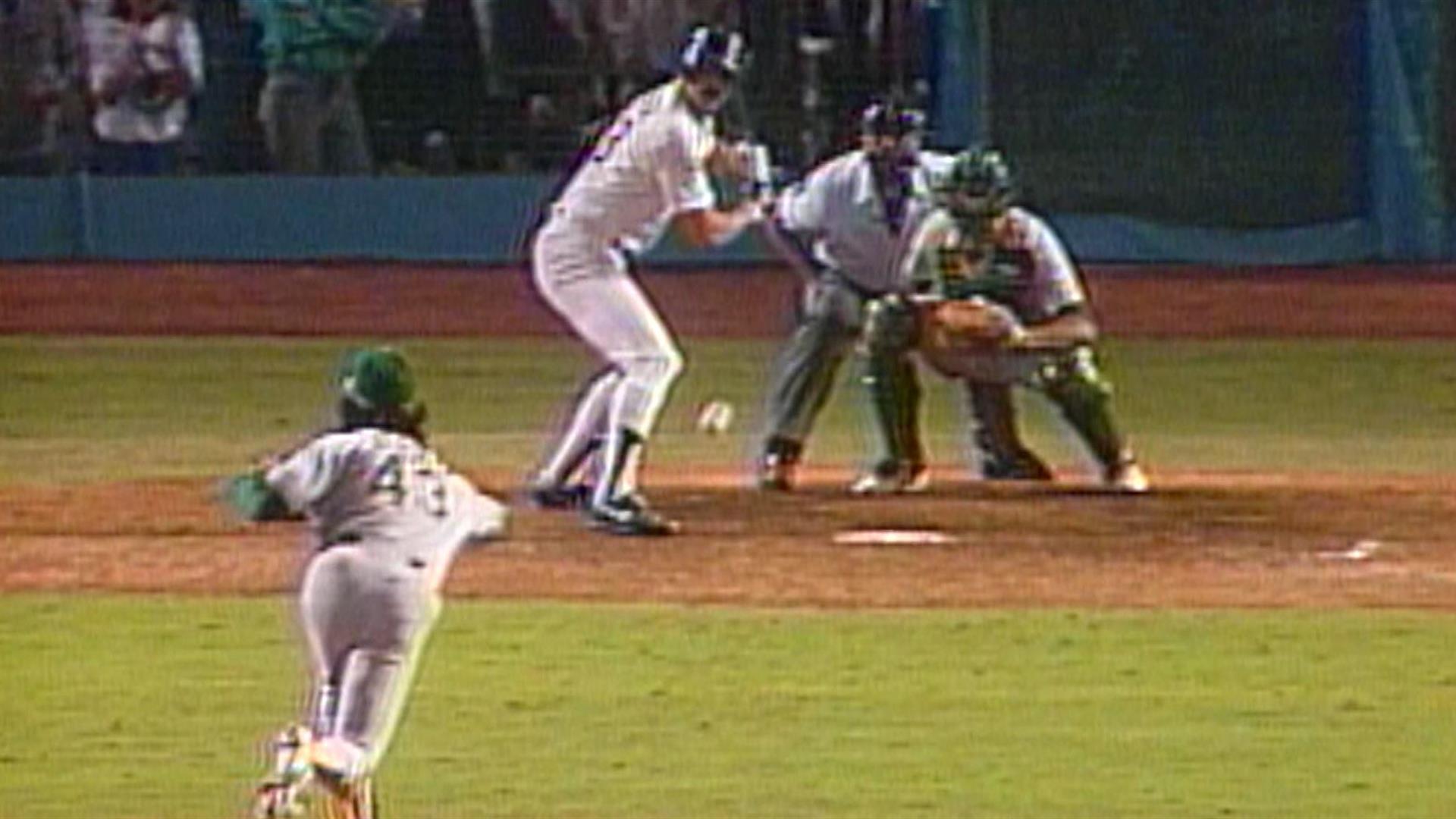
Or they can be big, with millions of people watching. Of this variety, my all time favorite is the Kirk Gibson home run in Game 1 of the 1988 World Series. You could not have scripted it any better—a hobbled hero given one shot to save the day against overwhelming odds. Here’s how it went down.

THE BACKSTORY

The Los Angeles Dodgers had been an under .500 team for two straight seasons. Then they got the opportunity to sign a premiere free agent, Kirk Gibson, age 31. The $4.5 million investment paid off. Gibson won the National League MVP award, batting .290 with 25 home runs, 76 RBIs, and 31 stolen bases. He led the Dodgers to their first division title in three years.

In the National League Championship Series, the Dodgers upset the New York Mets in seven games. Gibson hit home runs in Games 4 and 5. But his knees were hurting. He needed injections to play. And then in the last inning of Game 5, while sliding into second to break up a double play, Gibson pulled a hamstring. Which meant he would be unable to play against the Oakland A’s in the World Series. That made the Dodgers huge underdogs.

THE SET UP

Game 1 of the Series was at Dodger Stadium. The legendary Dodger announcer, Vin Scully, was calling the game for NBC, along with Joe Garagiola.

The Dodgers scored two runs in the first inning. The fans were excited. But in the second inning, Jose Conseco of the A’s, he of the huge (i.e., juiced) biceps, hit a screaming line drive with the bases loaded. The ball scorched over the centerfield fence and actually dented a TV camera. That’s how hard it was hit. Just like that, it was 4-2, A’s.

The Dodgers got another run in the sixth, and that’s where things stayed until the bottom of the ninth. With the score 4-3, the Dodgers had to face the most feared relief pitcher in all of baseball, Dennis Eckersley. This future Hall of Famer simply did not lose ballgames. I will describe the mood of the crowd by lifting a line from Ernest Lawrence Thayer’s immortal poem “Casey at the Bat.” On that stricken multitude a death-like silence sat.

Gibson was in the Dodgers training room, bags of ice on his legs, watching the game on TV. Before the inning started, Vin Scully said the following: “If you’re in the ballpark with binoculars, your first thought would be, late in the game, is Kirk Gibson in the Dodgers dugout? The answer would appear to be no…There is no Gibson. The man who was the spearhead of the Dodgers’ offense throughout the year, who saved them in the league championship series, will not see any action tonight for sure. He is not even in the dugout.”

At which point Gibson sat up on the training table and said, “My ass.” He threw on his uniform and told the ball boy to set up a batting tee. After a few thwacks he told the boy to inform Tommy Lasorda, the manager, that he could hit.

Eckersley retired the first two batters. Lasorda sent Mike Davis in as a pinch hitter. Davis had not exactly set the league on fire. In his own words, “I sucked that season” Yet this journeyman somehow drew a walk from Eckersley! The tying run was now on first base.

And then Kirk Gibson came out of the dugout, bat in hand. As Vin Scully put it on the broadcast: “And look who’s coming up. All year long, they looked to him to light the fire, and all year long, he answered the demands, until he was unable to start tonight with two bad legs…and with two out, you talk about a roll of the dice, this is it.”

THE MOMENT

The fans at the stadium went wild. I went wild in front of my TV.

But we all became more subdued after the first two pitches. Gibson, looking feeble, fouled them off. The count was now 0-2, and I don’t think there was anyone on the planet—except perhaps Gibson himself—who thought he could survive. Eckersley himself remembers thinking, “I thought he was a lamb. I’m thinking I’m going to throw him a high fastball and he’s done.”

Meanwhile, Mike Davis was becoming a distraction down at first.

On the next pitch, Gibson hit a little dribbler up the first base line. As he hobbled toward the bag, the ball managed to roll past the foul line. A miraculous save!

But Gibson was still up there with two strikes. Eckersley’s next pitch was a ball…and the A’s catcher, Ron Hassey, almost picked off Mike Davis at first!

Sheesh, could this tension get stretched any further?

Of course it could.

Gibson fouled off the next pitch. Then another ball from Eckersley, putting the count at 2-2.

Another ball, and Mike Davis steals second!

Now we’ve got a full count, two outs, bottom of the ninth, the tying run on second. And all Gibson was thinking about was putting the ball in play to score Davis.

Then he played a little mind game on Eckersley. Just before the next pitch Gibson called for time and stepped out of the box. Let Eckersley think about it as the fans were screaming. At the same time, Gibson was remembering what a scout told him. If ever he faced Eckersley with a 3-2 count, you can bet your ranch he’ll come at you with a “backdoor slider.”

Which is exactly what Eckersley threw. Gibson stuck out his bat and flipped it with his wrists. It didn’t look like a hard swing at all, but it happened to meet the ball in just the right spot.

Vin Scully called it: “High fly ball into right field! She is gone!”

Gibson started limping around the bases. Scully, as he was wont to do, let the crowd noise do the talking for a long moment. And then, off the cuff, came up with one of his fabled phrases: “In a year that has been so improbable, the impossible has happened!”

Gibson did not have another plate appearance in the Series, but the momentum from his home run carried the Dodgers to a five-game upset of the A’s.

Now that you know the story, you can have a look at it below. For me, this never gets old:

Lesson: When you write a big scene, write it for all it’s worth. Don’t hold back! Overwrite. Feel the emotions. Stretch all tension to the limit. You will edit the scene later to polish the rough edges. You may need to scale things back a bit for a greater effect. But get that raw material down first. Then your scene will have the potential to be a winning home run.

What’s a scene from a book or a movie—or real life—that has stayed with you? Why does it work?

The End of the Story…

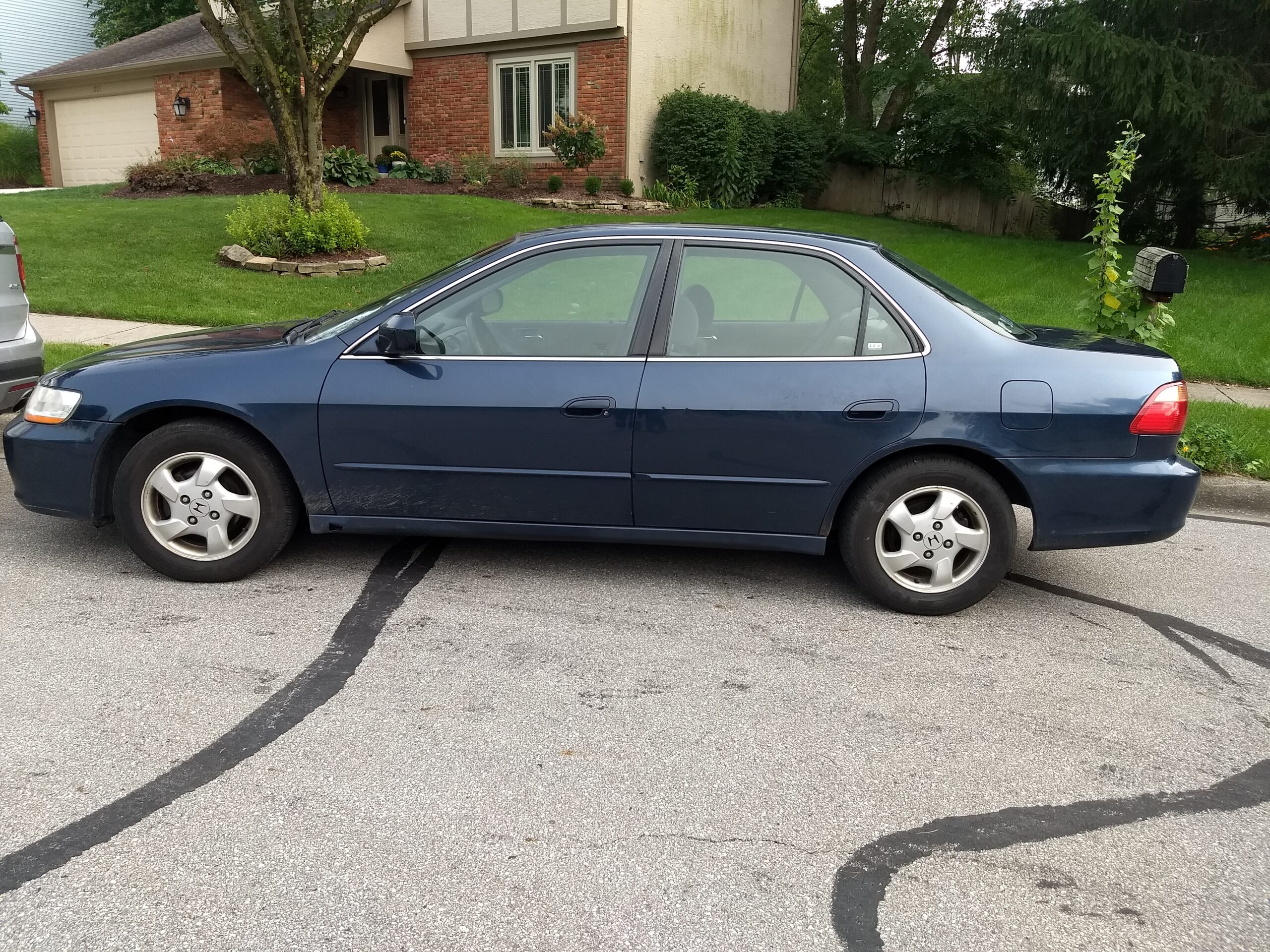
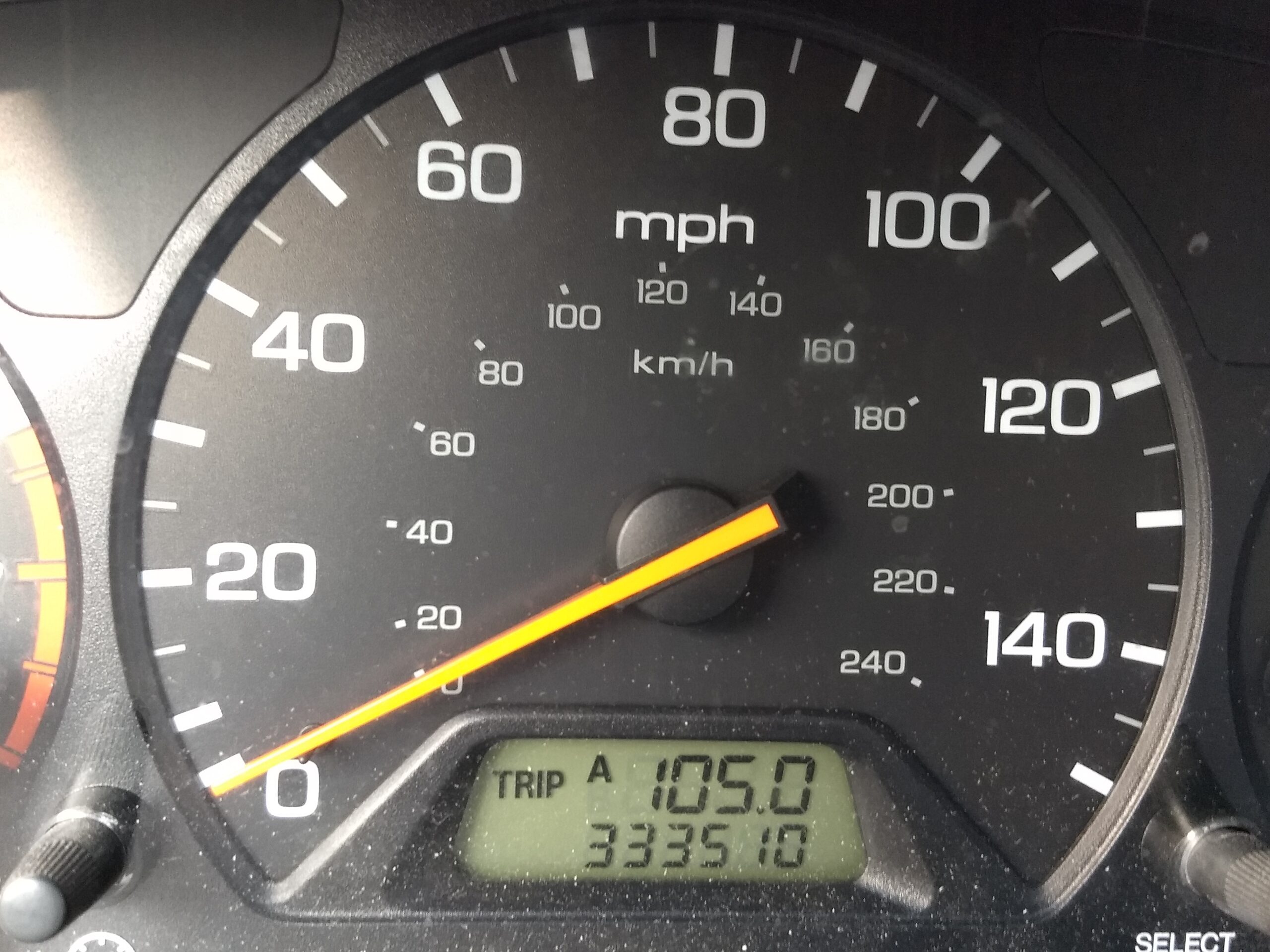
I took my 1999 Honda Accord into my mechanic last week for its regular oil change and inspection. The body showed its age but the car still rode nicely, even beneath the weight of its 333,500+ miles. 

One of three things can happen when one takes a car made in the last century and with high mileage in for an oil change and a look under the hood.  The first is that the mechanic can come into the waiting room and say to you, “You’re all set.” The second is that he can come up to you with a clipboard in hand and say, “You need your (fill in the blank) replaced, but hey, we can do that right now if you like!” The third is that he can stick his head into the waiting room and say, “You need to see this.” “This” is never good. Rest assured that he is not going to tell you that he found a winning Super Lotto slip taped to the engine block.

Number Three happened to me. I was solemnly ushered into the workshop as an organ dirge started playing in my head.  My car was up on a lift and appeared okay until the mechanic started pointing at certain areas with a pen and demonstrating that particular areas were loose.  I am not mechanically inclined but I could see that the undercarriage had some major rust in a couple of strategic places where the thigh bone connected to the knee bone, and the knee bone connected to the leg bone, and…you get the idea. My car was breaking apart. I received a long and patient explanation to the effect that repairing it would cost much more than the car was worth, what with the age of and the miles on the car. In answer to my question of how long it would last in its present state, the mechanic shook his head and said, “Possibly five years, if you don’t hit a pothole, but more likely five miles. Or five blocks.” His summation — “You need a new car” — was one that required no further explanation. 

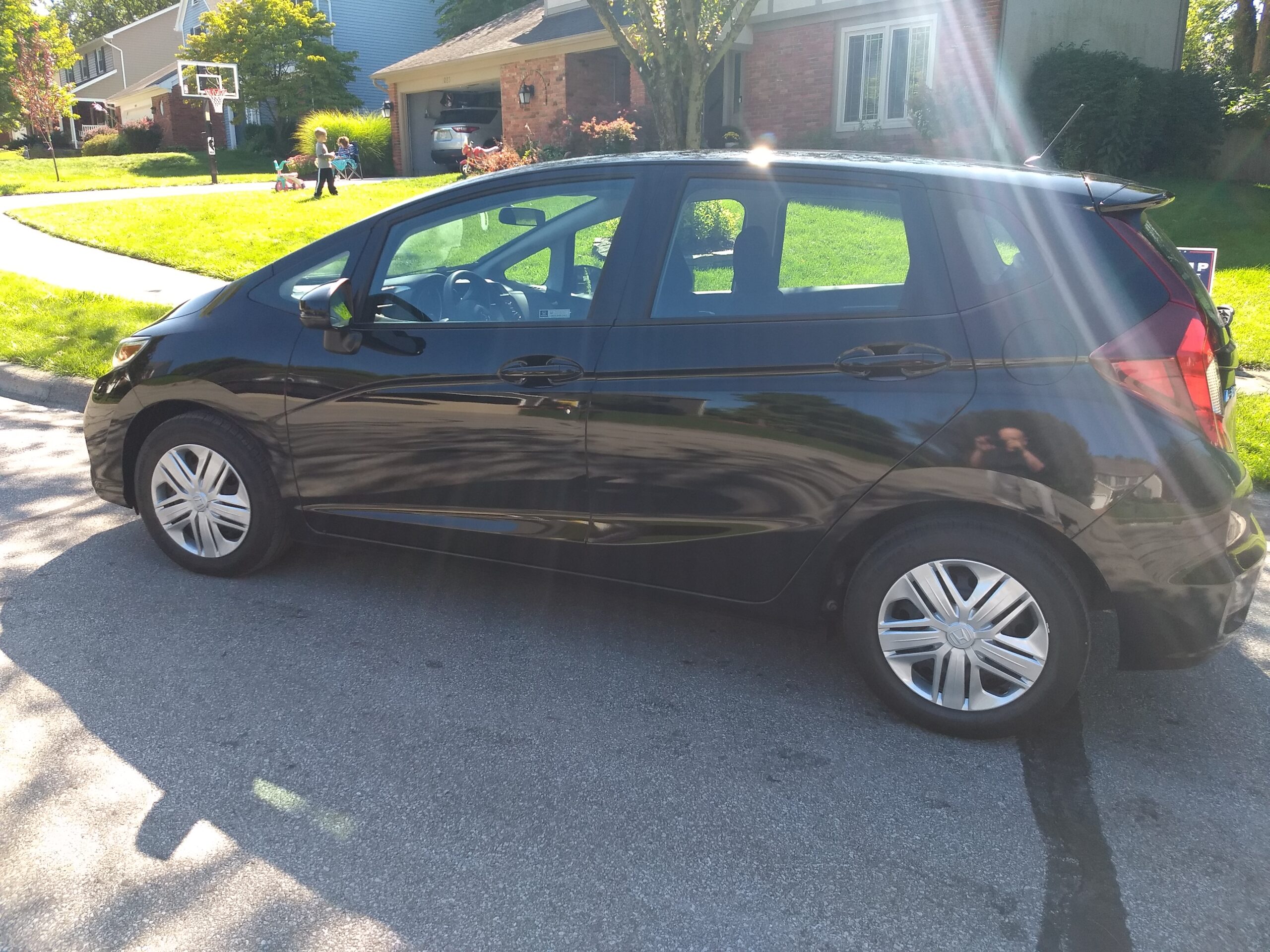
Some retroactive anxiety reared its head.  I had been driving my granddaughter and her friend all over the city during the Labor Day weekend in a car that was ready to come apart. The realization of what might have happened sealed the deal. I did some extensive research over a couple of days and leased something called a Honda Fit Hatchback. It has all sorts of bells and whistles that I am getting used to — I can now answer my phone using the steering wheel and rudely hang up on people, just like Ray Donovan  — but it is not much of an adjustment. 

I am a little upset. I try not to get too attached to the things of this world.  Cars specifically have never been important to me other than as a means of getting reliably from Point A to Point B. I am surprised by my emotional attachment in this case, however. I had a lot of physical and psychic DNA in that Accord. I used it to drive my children thousands of miles, to schools, parties, vacation destinations, movies, friends’ houses, shopping, concerts, and doctor visits. My granddaughter has been a passenger in it on an average of once a week since she was born almost fourteen years ago. I did some business traveling as well with it, going to and through thirty-seven states and having some adventures along the way, including a Pulp Fiction experience in Arizona and an encounter with tribal police in New Mexico which could have gone badly if not for my charming courtesy and winning smile.  I witnessed the most horrific traffic accident I have ever seen outside of a small town in North Texas. I drove to author conventions in Chicago, Indianapolis, New York, Nashville, Madison, Cleveland, and Phoenix,  made well over a two dozen trips to New Orleans and southern Louisiana, and somehow acquired a bunch of dear friends in the process. My Accord was always part of the story. Now it is gone. I donated it to a charity and watched as it boogied on down the road and across the rainbow bridge without me. 


The Honda Fit has a transmission which is called  “continuously variable,” a term that accurately describes my mood right now. It will in all probability be my last car, given my age and the manner in which my older friends seem to decline precipitously once they hit the downside of seventy. That’s part of a story that will be written at a future time by someone else. 

And on that note…

…have at it, chillun! Please tell us a car story, or your favorite book involving a car,.whether as part of a book written by someone else (you by all means can mention Christine or Drive), written by you, or a personal experience. Thank you and good day. 

All photos by Al Thumbs Photography

The soundtrack for today’s submission:

Rapture — Blondie 

Marquee Moon — Television

Y’All Think She’d Be Good 2 Me — C. C. Adcock

This Must Be the Place (Naive Melody) — Talking Heads 

Spare Me a Little of Your Love — Fleetwood Mac

Looking for A Kiss — New York Dolls

What a Party — Fats Domino

Soul Kitchen — X

It’s All Over — Willie Nile

Sorry You Asked — Dwight Yoakam

Time Has Come Today — Chambers Brothers

The Kids Are Alright — The Who

Bitches Brew (album) — Miles Davis

Reader Friday – Traditions

Reader Friday – Traditions.

TraditionstraditionsSundown today marks the start of the year 5781 on the Jewish calendar. Our family tradition revolves around the meal (which is true for virtually all Jewish holidays–they tried to kill us, we prevailed, let’s eat). Sweet dishes are the norm on Rosh Hashanah, to kick the new year off to a sweet start. At our table, dessert is always Pflaumkuchen (plum cake). The recipe varied, depending on which relative was in charge of dessert, and living where we do now, prune plums are almost impossible to get, but regardless of the details, it’s always going to be plum cake for dessert.

Any holiday traditions you’d like to share, food or otherwise? Have you ever included them in your writing?

Top Ten Tips on Formatting eBooks from MS Word

Indie publishing an eBook is a lot of work. It takes creative imagination along with some technical knowledge. And, it requires a lot of commitment mixed with dogged determination and a blind belief that someone is actually going to read the stuff.

Sometimes I wonder why I subject myself to this nonsense. I’ve been indie writing eBooks for eight years now, and I’ve put twenty for-sale publications online. But, I keep at it day-in and day-out—partly thanks to a simple system of formatting eBooks from Microsoft Word.

Notice how I used the term “indie” instead of “self” publishing. That’s because I don’t publish all by myself. Rather, I have a lot of help from a proofreader, a cover artist, and a whole bunch of friendly folks who I don’t know at Amazon, Kobo, and Nook. Someday I’ll make new online friends at Apple and Google as well.

It takes money to indie publish eBooks, and there’s no getting around it. Mary, my proofreader, and Elle, my cover designer, like to get paid and they’re totally worth it. I also pay for promotions through discount email sites like Booksy (Free and Bargain), Ereader News Today, and Fussy Librarian as well as click-ads on BookBub and Amazon.

However, I don’t pay for eBook formatting services which could run $100.00 or more for a proper and professional product (not a ten-buck Fiver special). Doing the math… at a $2.00 royalty that’d be at least 50 sales to break even on formatting costs. Besides, I’ve found the formatting process to be one of the best self-editing tools out there.

I know many writers detest using a PC infested with Word. They’d rather use a tool like Scrivener or their Mac equipped with Vellum. That’s fine, but I’m sticking with what I know, and I’d like to share my top ten tips for formatting eBooks from MS Word.

Tip #1 — Understand What eBooks Really Are

This sounds basic, and it is. If you look up “eBook” in the dictionary, you’ll find it’s a noun meaning “a book composed in, or converted to, digital format for display on a computer screen or handheld device.” An eBook is really a collection of digital characters forming a readable document.

There are two main eBook types. The most popular format is a Standard eBook that uses real-time, flowable text where the end-user can make personal changes to features like font type and size (settings). There are no page numbers (pagation) on standard eBooks because the total page numbers change according to the user’s size preference. Most novels are formatted as standard eBooks so they can be conveniently read on all types of devices like eReaders, desktops, laptops, and smartphones.

The other format is a fixed-layout eBook. These are popular for graphic-laden publications with images, graphs, tables, and charts where the material size can’t be changed. The graphics won’t “flow” across the page if you change settings but you can zoom in and out. Fixed-layout eBooks are popular with publications like cookbooks, children’s books, comic books, graphic novels, and educational textbooks.

Typically, you’d format a standard eBook for:

  • Publications with mostly continuous text
  • Works with small images embedded between paragraphs
  • Ensuring maximum usability on smaller devices like smartphones

Non-typically, you’d format a fixed-layout eBook for:

  • Preserving text over images
  • Wrapping text around images
  • Setting background colors
  • Using multi-columns or horizontal orientation

Tip #2 — Know the eBook File Types

There are over twenty eBook file types. By file type, I mean the software they’re written in. There is no one-size-fits-all when it comes to eBook formatting. However, as far as I know, you can convert a Microsoft Word document into any file type.

It’s important to know why there are so many eBook file types. It’s called technical evolution and business strategies. Some might call it money.

The eBook concept has been around a long time. Back in the 1930s, a guy by the name of Bob Brown got the idea of a “readie” after watching a “movie”. As Bob put it, “A simple machine which I can carry or move around, attach to any old electric light bulb, and read hundred-thousand word novels in ten minutes if I want to, and I want to.”

Bob was a little ahead of his time, but Michael S. Hart wasn’t. Hart is credited with inventing the first true eBook file type in 1971 when he worked as an engineer for Xerox in Illinois. He demonstrated his patent by typing the US Declaration of Independence into a digital file so it flashed up on a TV screen.

Sony upended Hart in 1990 with its Data Discman eBook player. So did Steven King. In 2000, King released the first true indie eBook with Riding The Bullet that was exclusive to online readers. It was downloaded 500,000 times in 48 hours.
And, along came Amazon. The ’Zon bought Mobipocket in 2005 and turned that eBook file technology into proprietary software exclusive to their Kindle eReader. I’m sure they intended to corner as much of the market as they could by allowing Amazon-published eBook files to be read only on Amazon-sold devices. Seems to me they did a good job of it.

That brings me to the three most popular eBook file types today—although there are over twenty in existence. All three file types have their own formatting quirks and quarks which a conversion software like Calibre looks after for you. All three files nicely work with a Word.doc… providing your format the Word.doc properly in the first place. The three main eBook file types are:

Amazon Mobi — This file is exclusive to Amazon and is also known as MobiAZW or .azw. Mobi files only read on an Amazon device like a Kindle or Kindle Fire. You can’t load a Mobi file on a regular reader like a Kobo or Nook, nor on an Apple product or in Google play. Don’t worry about how a Mobi file works. All you need to know is it’s picky about how you prepare a Word.doc for it.

EPub — This acronym stands for electronic publication, and it was uniformly endorsed by an outfit called the International Digital Publishing Forum in 2007 to replace the older Open eBook file system. EPub is used exclusive of Amazon, and you can’t load an EPub file on a Kindle. Apparently, an Amazon black hole will open up and swallow you if you try. So, if you plan on “going wide” and publish on non-Amazon forums like Kobo, Nook, Apple, and Google, you’ll have to format your Word.doc as an EPub file.

Adobe PDF — Here we have the difficult child in the eBook file family. A Portable Document File is technically an electronic book, but some electronic publishers make it sit in the corner. PDF’s are great as technical eBooks that you can share online or use as an email list magnet, but they aren’t compatible files for commercial eBook sites. And, whatever you do, do not try to upload a PDF to a retailer in place of a properly-formatted Mobi or EPub file. It will turn into a mess.

Tip #3 — Appreciate How a Microsoft Word Document Works

Let me say that I’m not an expert on MS Word. Not by any means. I’ve written millions of words in this software program, but there’s a lot I don’t know about it. However, I know enough about Word to get it to do pretty much what I need it to, and I’m comfortable with that.

Microsoft Word is a word processing program. It’s the gold standard when it comes to managing text documents, and it’s used professionally and recreationally by over a billion people. No word processing tool even comes close to Word for popularity.
In 1981, Microsoft bought an existing processing program called Bravo. They had a top engineering team re-invent Bravo which they released as the Multi-Tool Word for Xenix Systems. It was meant to compete with WordPerfect which was the leader at that time, and its name was soon shortened to Word.

Word has been renovated many times over the past four decades. I use Word 2010 because I’m a Luddite and too cheap to upgrade to the new Word 2019. For eBook writing and formatting, my Word version works fine and I’m sticking with it on Windows 8.

Word wasn’t very popular at first. It was clunky and troublesome with a big learning curve. That changed as Word became more WYSIWYG (What You See Is What You Get) and allowed users to customize their documents and view on-screen what the end product would look like.

My Word 2010 has eight tabs on the upper toolbar. I use five of them daily—file, home, insert, page layout, and review. The other three—references, mailings, and view—are there if needed.

MS Word has some marvelous shortcuts. They are real time-savers and can resuscitate an accidentally-erased page part or an entire document at the press of two keys. Here are the shortcuts I regularly use:

  • Control + A highlights the entire document
  • Control + C copies the highlighted portion
  • Control + F opens a search bar
  • Control + K opens a hyperlink window
  • Control + V pastes a copied piece of text
  • Control + X cuts a highlighted portion
  • Control + Z restores a delete

The Control + Z feature has gotten me out of more writing, editing, and formatting pickles than I can remember. Thank God the MS engineers built this into their Word software. It also transports with a Word.doc when you transfer it into an eBook formatting tool like Calibre.

Tip #4 — Become Very Familiar with Your MS Word Home Tab

Your home tab is the main tool belt for Word. Most features that you need to write an eBook are right there at your fingertips. Let’s go through the main tools and discuss what works best for drafting a Word document that easily formats or converts into a Mobi and EPub file

Font Face — Depending on the Word version you’re working in, you’ll have dozens and dozens of font styles to choose from. There are hundreds more available to download from the net. That’s all fine and well to get fancy on your Word doc, but that’s not okay when you go to format your eBook. No matter what font face you pick, Amazon’s Mobi proprietary software is going to output your font in a fixed serif style so you might as well use Times New Roman right off the bat. EPub platforms are a bit more font-friendly so you can use a serif style like Adobe Garamond or a sans serif typeface like Ariel.

Font Size — The nature of eBook operation is that the reader can modify their on-screen font size to suit their pleasure. However, keep your Word doc as clean and uniform as you can. I recommend that titles go in 24 point, introductions in 16 point, chapter headings in 14 point, and all text in 12 point. Do not use a font size larger or smaller than 12 for your main text body or you’ll regret it.

Bold, Italics & Underline — Both Mobi and EPub files will import hidden html code from Word that specializes your font accents like bold, italics, and underlines. They’ll convert from Word to an eBook file without having to identify strange-looking html symbols like <b>, </b>, <i>, </i>, <u>, </u>, etc.

Font Color — There’s no problem using a colored font in Word and having it formatted on either main eBook file. I’d strongly suggest keeping your font in standard black which should be your default font color. Deep reds or blues are nice to make a point but don’t even think about using any color except white for your background shading. It will not convert.

Bullets and Numbering — Also, there’s no problem getting automatic list numbering and billeting to convert from Word to an eBook file. It’s not like WordPress which has a hissy-fit if you try to import something creative.

Align Text — You should use align left for the vast majority of your document text. If you need to make a point with a scene break or something requiring a center text, that will show up fine on an eReader, too. Avoid using align right because it reads really weird on an eScreen.

Justify — Word lets you set your text with evenly aligned or justified left and right margins. That causes your words to stagger in spacing which looks crisp and clean on a Word screen. However, when you format a justified document into an eBook file it can look messy on an eReader. Do yourself a favor and don’t format your Word document with a Control + J justification. When a reader enlarges the font on their device, there will be ugly gaps in the word spacing.

Line and Paragraph Spacing — Use 1.15. That’s it. 1.15 only.

Style Boxes — Use the Normal setting for all text and Heading 1 for anything you want to appear in your table of contents (TOC). Set your style default to the font face, size, and color you want and leave it there. It’ll save a lot of formatting time. Ignore the No Spacing, Heading 2, Title, and Subtitle style boxes.

Find & Replace — This feature is irrelevant to formatting, but it sure makes your writing and editing life easier.

Tip #5 — Be Careful with Indents and Paragraphs

If there’s one area that could get you into a maximum-security eBook formatting prison, it’s screwing up indent and paragraph formatting on your Word document. I can’t stress this enough!!!

Most writers probably use the enter and tab keys for paragraph spacing and indenting the first line. This looks good on a Word doc and a PDF, but it’ll be a pile of doggy-doo when you see it on a Mobi or EPub file.

I do eBook formatting for friends, and I see this error repeatedly. To fix it, the Word doc has to be exorcised of this formatting demon. This is a big job if you try to fix this manually. The trick is to highlight the entire document and use the Find/Replace feature. You enter  ^t  in the Find field, put nothing in the Replace field, and click Replace All. It will reset your Word doc to a neutral format so you can properly rework it as Mobi and EPub compatible.

What you have to do (if you want industry-standard eBook formatting for paragraph indents and spacing) is to use the tiny little “paragraph” feature on the bottom center of the Word toolbar. Click on the enlarge icon which, at my age, you need glasses to see.

The paragraph window opens and offers you options for indents and spacing as well as line and page breaks. Do this:

  • Alignment — set on “left”
  • Indentation — set left and right at “0” (zero)
  • Special — set as “first line” (this is probably the most important eBook formatting tip)
  • Spacing — set before and after at “0” (zero)
  • Line Spacing — set at “single” (your main toolbar setting at 1.15 will override)
  • Line and Page Breaks – leave at the Word default setting (more on this coming up)

Terry Odell did a great piece on yesterday’s Kill Zone titled Ins and Outs of Indie Publishing: Going Wide. Terry nailed it with this advice on formatting, “Some basics are formatting in TNR, 12 point font, 1 inch margins all around, and use a paragraph style for indenting, NOT TABS. EVER.”

Tip #6 — Use Show and Hide

This MS Word feature is an absolute godsend to eBook formatters. It’s truly lifesaving. This is the show and hide symbol: ¶ It’s right up there at the center of your Word toolbar to the left of the style boxes. At least it’s there on Word 2010. I’m not sure about other versions, but I’m sure it’s not discontinued.

Show and Hide (¶) lets you view your Word doc behind the scenes. It allows you to check spacing, indents, font size, and little things like hidden bold, italics, and underline specialties that lie between lines and paragraphs. ¶ lets you adjust your entire document for uniformity. There will be non-conforming information in your document that you can’t see on a Word screen but will confuse the eBook conversion/formatting and it can become real dog-vom when it shows up as a Kindle, Kobo, Nook, Apple, or Google eFile.

Tip #7 — Be Careful With Page Breaks but Promote Page Layout

By design, eBooks are fluid and non-editable. Although there’s no way for an outside party to enable editing on a published eBook, the reader has total control over using their eReader in a personal manner. They can adjust all sorts of reading conditions from size to lighting, but they can’t modify the content.

That includes page breaks. You, as the writer in Word and the formatting in EPub or Mobi have total control on how you want to interrupt your reader’s flow. Be aware that they might not like pre-assigned page breaks. However, they’ll hate an eBook that isn’t properly formatted for page layout.

There are two schools of thought about placing page breaks into a Word doc destined for an eBook file. One is to leave page breaks out altogether and let the eFile software run the show. The other is to strategically place page breaks where they work to help the eFile, not hinder it.

The page break feature on Word is in the Page Layout tab at the top left third space, and it’s called “Breaks”. If you click on it, you’ll see a lot of options to stay away from. If you must use a page break, just put your cursor on the next paragraph indent and click “page”. You’ll see a line that interrupts your Word text and starts a new page. It does the same on an eFile.

Use page breaks sparingly. The beauty in an eReader is experiencing a continuous flow and a page break can take the reader right out of the book. I don’t place page breaks between chapters. The only place I put a page break is when I add a graphic like an inserted picture. The page break ensures the insert will show up as a whole on a screen and not be cut off.

There are two more highly-important features in Page Layout and you need to set them like this:

  • Indent Left: 0 cm
  • Indent Right: 0 cm
  • Spacing Before: 0 pt
  • Spacing After: 0 pt

Your left and right margins are likely set by default at 1 inch or 2.54 cm. If they are, leave them there. If not, make them your standard Word doc default setting. The reason you put paragraph spacing at 0 pt before and after is so you can manually set them with your spacer or enter bar when you review your document with the ¶ feature. If you have a mixture of automatic spacing and manual, your eFile format will be messed up.

Tip #8 — Insert Images that Don’t Get Messed Up

To eBook file credit, they’re image friendly. To their discredit, they’re quite picky about formatting from a Word document. With eBook formatting from MS Word, you can’t eat your cake and still have it too.

Like another activity, size matters in eBook formatting. Here’s the #1 rule when formatting images in a Word doc. Don’t do it.

Instead, prepare your images in another software form and save it as a jpg or png file. Once you have it eBook compatible, then use the Word Insert tab to paste the image where you want it in the Word doc. Mini-tip: Insert the image using the center align feature on the toolbar – not the justify one.

I use good old Paint to format an image headed for an eBook. I take a screenshot or download an internet-based jpeg or png and upload it to Paint. Then, I crop the image and size it to 500 pixels wide by whatever height works. I “save as” and then insert it into the Word doc. It then stays stable as an eBook image at a manageable 500 pixel-wide size despite what an end-user might do with setting changes on their reading device.

If you try to size images within Word, they’ll do what they want as an eFile and the professionalism of your formatting will be compromised. Remember the KISS principle (Keep It Simple Stupid). There’s no need to complicate eBook image formatting as long as you import a pre-formatted image into Word before converting to an eFile like Mobi or EPub.

Tip #9 — Use Calibre for Formatting Word to Mobi or EPub

Like Word, I don’t profess to be a Calibre guru. In fact, the more I use Calibre as an eBook formatting/conversion tool, the more I KISS. Calibre can have a big learning curve if you want to know the geek stuff.

I don’t. I only want to write an eBook in Word, format/convert it into a Mobi or Epub file, and put the product up for sale on a retail platform. I don’t care about how the things work. You can download free software for Calibre here.

Don’t be intimidated by Calibre. It’s an eBook conversion software system designed like a pipeline. Schematically, here’s how it works:

  • Step 1 — Input Word doc format
  • Step 2 — Input Calibre Plugin (Mobi or EPub template)
  • Step 3 — Transform
  • Step 4 — Output Plugin (Mobi or EPub finished file)
  • Step 5 — Save eFile to your hard drive and/or flash drive
  • Step 6 — Upload your eFile to your eBook retailer’s dashboard

Functionally, here are the simple steps to convert a Word document into an eFile on Calibre:

  • Step 1 — Open Calibre
  • Step 2 — Click Add Books
  • Step 3 — Upload your Word.docx
  • Step 4 — Click Enter Metadata (you can leave this blank and move on)
  • Step 5 — Click OK
  • Step 6 — Verify Input Format is DOCX and set Output Format (you have a choice that includes EPUB and MOBI. AZW3 is also there, but just use MOBI for Amazon)
  • Step 7 — Click OK (the JOBS icon circles in the lower right. When it stops, you’re done)
  • Step 8 — Slick SAVE TO DISC and select the folder on your computer.

It’s now saved as formatted eFile that’s ready to put up for sale on a retail eBook site. There are a lot more things you can try on Calibre but if you KISS, that’s all you have to do. Note: You have to repeat the process for each eFile conversion.

That’s it. Formatting a Word document to an eBook is this straightforward. The trick is making sure your Word doc is eBook friendly. I can’t emphasize this enough!!!  Oh, BTW, save your Word document as a Word.docx. It’s the most recent form and it’s compressed with less chance of being digitally compromised.

Side Note: Amazon now allows you to directly upload a Word.docx to KDP, and their system will automatically convert it to a Mobi/AZW file. I’ve tried it and it wasn’t pretty. However, I’ve uploaded a Word.docx to Kobo and it came out great. You can also use an eBook aggregator like Draft2Digital or Smashwords to format your Word document, but they’ll take a 10% cut for their service. Again — the real trick is to make sure your Word.docx is properly set up before converting it to an eFile.

Tip #10 — Have Fun & Make Money

I have no ethical problem about making money from turning Word docs into eBooks. However, actually making money this way is an art on its own and when I find the secret I’ll gladly share it. For now, though, I’m having fun doing this.

How about you Kill Zoners? What’s your experience with MS Word and formatting eBooks? Please share what you know or ask what you don’t know.

——

Garry Rodgers is a retired homicide detective and forensic coroner. Now, he’s a struggling indie publisher who writes crime stories on Word, formats them on Calibre, and flogs them on Amazon, Kobo, and Nook.

Garry lives on Vancouver Island in British Columbia on Canada’s west coast. When not writing, Garry Rodgers spends his time putting around the saltwater and hiding from the taxman.