by Steve Hooley

March is National Reading Month. Since we are writers, and readers are vital to our success, I thought it would be appropriate to “share” our national month with the rest of the world and rename it “World Reading Month.”
Reading month was established in March to celebrate the birthday of Dr. Seuss (3/2/1904) and his contribution to increasing the interest of reading in children.
We’ve discussed ways to get young people interested in reading.
We’ve discussed our favorite writers’ style and the Rushmore authors.
If you thought “extracurricular” in the title of this post is being used with the connotation of “extramarital,” I’m sorry. It’s not. I did use the phrase to draw you in, and please don’t stop reading now. We have a three-course meal, plus dessert and drinks, so stay with us.
Our “extracurricular” activity today is “outside our normal curriculum” of writing fiction and the craft of writing fiction, specifically reading nonfiction.
Now we’re getting into hobbies and special interests. And this is where your passion for your special interest kicks in and you can’t wait to tell the rest of us how exciting it is to study entomology and the Giant Weta.
Therefore, we will dispense with any pretense of an academic prelude, and move directly to the discussion where each of you can lecture on the importance of your beloved subject.
But, on second thought, I better provide some “meat” for our meal, or I’ll lose my job here as a cook. So, here are three dishes for our main course: (Remember, it’s World Reading Month.)
Benefits of Reading
This is a short list of the many benefits of reading.
- Improves brain connectivity and memory
- Increases vocabulary and comprehension
- Empowers ability to empathize with other people (note this was listed under reading fiction)
- Aids in sleep readiness
- Reduces stress
- Lowers blood pressure and heart rate
- Helps fight depression
- Helps prevent cognitive decline with aging
- Can help increase IQ in children
- Improves concentration and ability to focus
- Improves analytical thinking skills
- Improves writing skills and communication skills
Reading Disorders
- Dyslexia – occurs on children with normal vision and intelligence. Symptoms are late talking, learning new words slowly, and delay in learning to read. Common with 3 million cases/year in the U.S. Treatment can help, but doesn’t cure.
- Phonological Dyslexia (auditory dyslexia) – difficulty processing the sounds of individual letters and syllables, and cannot match them with the written form
- Surface Dyslexia (visual dyslexia) – difficulty recognizing whole words, from probable vision issues or processing
- Rapid Name Deficit – difficulty with naming a letter, number, color, or object quickly and automatically
- Double Deficit Dyslexia – combination of both phonological and rapid naming deficit, and is the cause for the majority of the weakest readers
- Alexia – occurs after stroke or brain injury
- Hyperlexia – have advanced reading skills, but have problems understanding what is read or spoken out loud
- Specific Skills
- Word decoding – similar to phonological dyslexia with difficulty sounding out words
- Fluency – difficulty with reading quickly and accurately
- Poor reading comprehension – difficulty understanding what is read
- (My addition) – Sine Tempore Legere – Without Time to Read – children and adults who are too busy with work, hobbies, school activities, TV, and social media – currently undecided whether there is a cure, or whether this is terminal
Early History of Reading
Beginnings
- 4th millennium BC – Mesopotamia – picture symbols on clay used to keep track of business transactions
- 2600 BC – beginning of cuneiform script – used to document laws, record deeds of kings, and keep records of transactions – each syllable had a different sign – number of characters ran into the hundreds – learning to write and read was an enormous achievement
- 2300 BC – earliest author named, woman, Akkadian princess and High Priestess, Enheduanna – wrote temple hymns, signed her name
Reading as Performance
- 200 BC – punctuation was added – erratic into the Middle Ages – written material reached the illiterate masses through public readings
- 5th century BC – Greek historian Herodotus read his latest works at the Olympics
- 1st century AD – author readings became a social convention in Rome
- Being read to became an avenue for entertainment and acquiring knowledge, especially for women, well into the 19th century
- Texts were meant to be heard rather than seen – reading silently remained a curiosity
Reading Silently
- 330 BC – Alexander the Great’s troops were awestruck when he read a letter silently in front of them
- 9th century AD – first regulations requiring scholars to work in silence in monastic libraries
- As better punctuation was added, books became more accessible, and pictures were included, silent reading became the norm, with more and more readers
- 14th century – Chaucer recommended reading in bed
Print Revolution
- Earliest print technology originated in China, Japan, and Korea by rubbing pages against inked woodblocks
- 13th century – print technology reached the western world – woodblock printing widespread by the 15th century
- 1430s – Gutenberg – first mechanical printing press in Strasbourg, Germany
- 1450 – press was operational and printing copies of the Gutenberg Bible
- Churches began to educate the masses
- Village schools and literacy grew
- Book sellers began printing copies of popular ballads and folklore
- Early 18th century – periodicals began to be published
- Novel as a literary form took root in France and England
- 1849 – Dickens – Pickwick Papers – serialized in a magazine, combining the attraction of the novel and the affordability of the magazine
Libraries
- 7th century BC – Assyrian ruler, Ashurbanipal, put together the first library – collection of clay tablets
- 331 BC – Alexander the Great’s successor, Ptolemy I, founded a library in Alexandria, Egypt
- 2nd century BC – library in Alexandria is catalogued
- 18th century – proliferation of lending/circulation libraries in Europe and N. America
Okay, enough of the main course. It’s time for dessert and the after-dinner drinks and entertainment. It’s time for you to share your extracurricular passion, your nonfiction passions and interests.
Our Questions:
- Do you read any nonfiction beyond craft-of-writing? What topics do you like to read or study? And why do you think they are important.
- Have you written any nonfiction books (excluding craft-of-writing)? Tell us about them, and why we should buy and read them.
- Are there any nonfiction projects you are considering, planning, researching, or currently writing? Is there anything you can tell us about them without revealing your trade secrets?
 Today is National Tolkien Reading Day. How many of Tolkien’s books have you read? Bonus points for naming them. Which was your favorite and why?

 Shotguns also give you many options in terms of ammunition, and you should base your choice on a number of factors, not the least of which is where you live. (See above.)
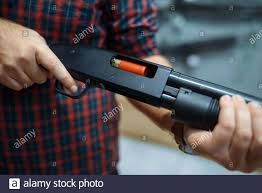 When most people think “shotgun”, I believe they see the venerable 12-gauge shoulder buster that is featured in cop shows. Deployed properly, it’ll definitely do a number on the bad guy, but an apartment dweller needs to give serious consideration to the size of the shot and power of the loads he’s using. One of the commenters on Sue’s post on Monday posited the use of a 12 gauge slug against an intruder. Um, no. Not unless he’s fifty yards away and looks like an attacking grizzly bear.
 In most circumstances, even 00 (“double-aught”) buckshot is too hot for home defense. Every trigger pull of 00 buck launches 9 to14 .33 caliber pellets down range at 1,700 feet per second, give or take. It will drop whatever you hit, and at short ranges will likely pass right through your target with little reduction in speed. I think that a .410 shotgun loaded with #4 shot (.24 caliber pellets) is a better choice. It’s got far less recoil, but plenty of umph to stop your intruder. Even the hotter versions of birdshot will take the invader out of commission, and will pose less chance of collateral damage.
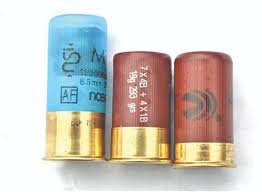 If the shotgun in your closet is already a 12 gauge, consider “short loads”, which have considerably less powder, and therefore lessen the hazards to your neighbors.



 Garry Rodgers is a retired homicide detective and coroner. Now, he’s reincarnated as an indie crime writer who’s left the dark side of Amazon exclusivity for the wide light of other publishing platforms like Kobo, Apple, and Nook.
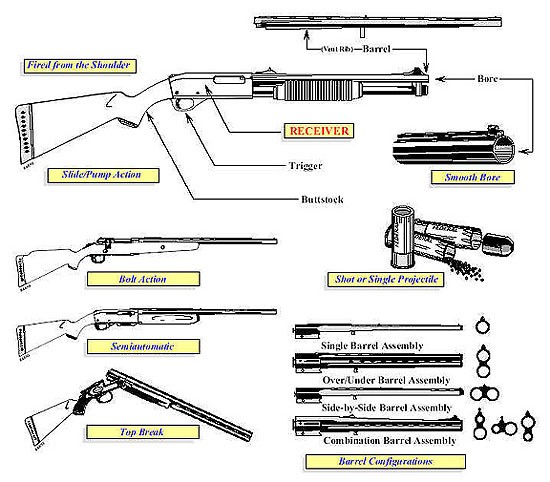 A great example of this is in a current book I read a few weeks ago, where the main character “racked” a shotgun shell into the chamber of her rifle. A quick message to an expert, such as Kill Zone contributor and weapons expert John Gilstrap, and the writer would have learned that racking a shotgun shell into the chamber is an action used for shotguns, not rifles.