by James Scott Bell
@jamesscottbell
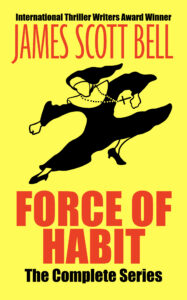 Allow me to get some shameless self promotion out of the way: Today is the release of FORCE OF HABIT: THE COMPLETE COLLECTION. The ebook is available for a limited time for the deal price of $2.99. (Outside the U.S. go to your Amazon store and plug this into the search box: B091DRDWRJ.)
Okay, now let’s talk about formatting your book. If you’re an indie writer, this is fundamental. But traditionally published writers may also wish to self publish some work (e.g., a short story or novella) as added marketing.
Formatting is critically important, because readers have been conditioned to expect a certain look. Like no spaces between paragraphs and standard indenting. If your formatting is clumsy a reader may set the book aside even if you have a solid story going.
For your book’s interior, you have two choices: You can learn to do your own formatting, or you can hire it out. For the latter, you may expect to pay somewhere in the range of $300–$800 for an EPUB and pdf file. (Note, the mobi format for Kindle is not being used anymore. EPUB is now the standard. However, you may wish to create a mobi file in order to send out an ARC that can be sideloaded onto a Kindle device.)
I’ve not used formatting services myself, but a few I’ve heard good things about are Booknook, EbookPbook, and BookDesignTemplates.
Reedsy also offers design services (and in addition has a free formatting app for DIY).
So let’s say you decide to format your own books. There are many options (and please share in the comments any you have found helpful).
I use Scrivener for my writing, and have used it in the past for my formatting. It’s tricky to get it right, however, and the formatting choices are limited. This blog post offers some useful Scrivener tips in that regard.
At one time I also used the free formatting app Calibre. I’ve not seen the latest iteration, but I think it’s still safe to say it does an adequate job.
The biggest problem I see with these options is that when you want certain design elements, like drop caps or ornamental breaks, it’s hard to get them to come out right.
Amazon now offers a free program called Kindle Create. I haven’t used it, but it looks pretty good. It seems to be a decent, though limited, alternative to my app of choice, Vellum.
Vellum is a Mac-only program that is so simple to use, with such beautiful results, that I cannot recommend it highly enough. It’s well worth the price, because you’ll probably be using it the rest of your indie life. (NOTE: I am not affiliated with Vellum, so get no compensation from recommending it.)
Broadly speaking, you choose a design template from the Vellum library. Within a template you select various options, such as how you want opening paragraphs to look, if you want drop caps, and what style of ornamental break you like (you can import your own, too). Front matter and back matter are easy with Vellum’s pre-designed pages.
(NOTE: Although Vellum is a Mac-only program, I understand you can use a “Mac emulator” to run it on a PC. One such option is discussed here.)
The design choices in Vellum fit different genres. You can test the various styles, which show up instantly onscreen, and soon enough you’ll find the look you prefer.
For the pdf/print version, you can change the trim size, margins, and font size.
Vellum also automatically puts in a scene break line at the bottom or top of the page. This is incredibly helpful, as those breaks are hard to see on your own. (What I’m describing is when a scene ends at the bottom of a page and a new scene begins at the top of the next page. Good typography demands an ornamental line, such as ***, to indicate this for the reader.)
Another plus is the ability to put in different front and back matter for the ebook and print. For example, in your ebook back matter you’ll want to include direct links to your newsletter sign up, other titles, and the online store review page. But links don’t work in print, so you design those pages differently and choose “Include in Print only” from a drop down menu.
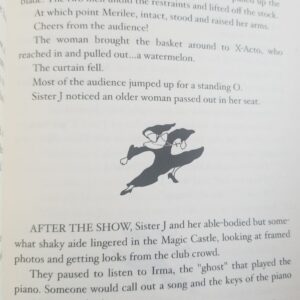
I have to say, the print edition of FORCE OF HABIT is gorgeous. For my fiction, I choose cream paper over plain white. It just looks and feels better to me. For my ornamental break I used the flying fists of fury nun design. The pages look like this:
Print Formatting Errors to Avoid
At a conference years ago, a writing friend joined a bunch of us who were sitting around, and showed us a copy of her new, DIY print version, several copies of which she’d consigned to the conference bookstore. I gave it a quick glance…and almost didn’t have the heart to tell her of a glaring formatting error. At the end of one her chapters was a blank page. But she had the title-header at the top of the page and the page number at the bottom.
Ack! A reader seeing that will think there was a printing error, and the book is missing text!
A blank page, if you have one, should be as clean as driven snow (as an L.A. resident I don’t know why I choose this metaphor). Vellum knows this, and takes off header/page number when you have a blank page.
Another error is having even-numbered pages on the right hand side. Never! Always start your book (after front matter) with page 1 on the right.
Isn’t it quite amazing that today an author can create both an e- and print book that looks every bit as good as a something from a big publishing house? (The answer you’re looking for is YES.)
So what is your formatting process? What programs do you use? And please share any additional tips you have!

 “Most people think they have a book inside them. That’s usually the best place to keep it.” – James Scott Bell
 With over two million books sold to date,
  In February 2017, Only The Truth became a worldwide bestseller, reaching storewide number 1 at both Amazon US and Amazon UK, making it the bestselling book in the world at that moment in time. The same day, Amazon’s overall Author Rankings placed Adam as the most widely read author in the world, with J.K. Rowling in second place.
 Note from Garry Rodgers: I’ve known Adam Croft for nearly a decade and I can personally vouch for his outstanding ethics, integrity, and trustworthiness. Two years ago, Adam developed his Indie Author Mindset program which was completely game-changing for me. The program consisted of two books, a series of tutorial articles, and a Facebook group page.